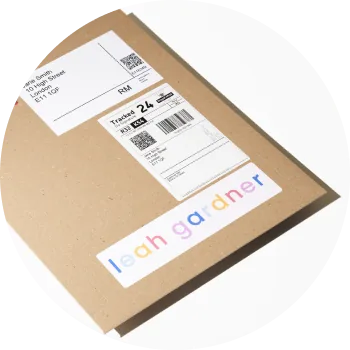
You can add branding to your drop shipping orders through three branded elements on every order, so your work arrives with your brand at the heart of it. When you're selling art online and building repeat business, first impressions — from packaging through to product — really matter.
The three branded elements you can add
- Branded biodegradable stickers — custom stickers applied to the shipping packaging, and the first thing your customer sees on arrival.
- Branded certificate of authenticity (COA) — a printed certificate included in the package with your name, signature, logo and edition details.
- Branded custom A4 insert — a personalised letter or insert to thank the buyer, share the story behind your work, include care instructions, or link to your other drops.
Together, these turn a single transaction into a complete brand experience.
Setting it up
- To set up a COA, first upload your artist name (in Settings → Account), logo and signature to your Media Library, then choose them during drop setup.
- For the sticker and insert, configure them in Settings → Fulfilment.